

Copyright Attribution
ArcGIS® and ArcMap® are registered trademarks of Environmental Systems Research Institute, Inc. (ESRI). The software screen shots shown in this page are reprinted with permission from ESRI.

 Homepage Research Staff Publications Useful Links Email Us
  Learning Materials Glossary Past Workshops
  Geographical Referencing Learning Resources
 This method example will demonstrate how to form a spatial data linkage between two sets of data which are in this case car crimes and police beats data. The sample data are available as car_crimes.zip (click [here] to download) and police_beats_atts.zip (click [here] to download) respectively.
After saving and unzipping the zip archives. Start ArcMap, add both the car crimes and the police beats with attributes shapefiles as layers, using File > Add Data. Right-click on the car_crimes layer and select Joins and Relates > Join to bring up the "Join Data" dialog box.
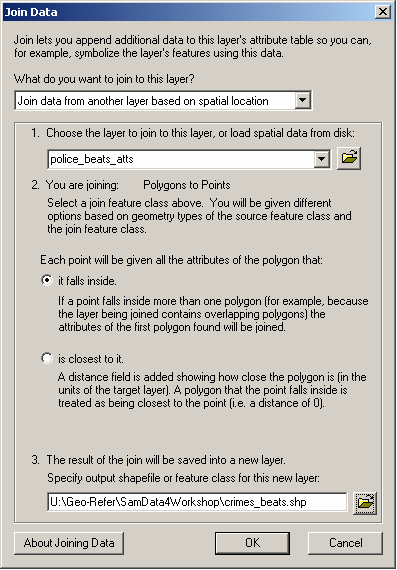
First, specify that you want to "Join data from another layer based on spatial location" and then select the layer which you wish to join to this layer i.e. select the police_beats_atts layer. The dialog box will confirm that you are joining polygons to points, which is correct.
Second, specify that you wish "each point to be given all the attributes of the polygon that it falls inside".
Third, specify a suitable pathname and filename for the output file e.g. crimes_beats.shp, ensuring that the file will be saved as type "shapefile". Note that you should specify a different name to the input file.
ArcGIS® and ArcMap® are registered trademarks of Environmental Systems Research Institute, Inc. (ESRI). The software screen shots shown in this page are reprinted with permission from ESRI.